Step 01
Configure the Right Panel
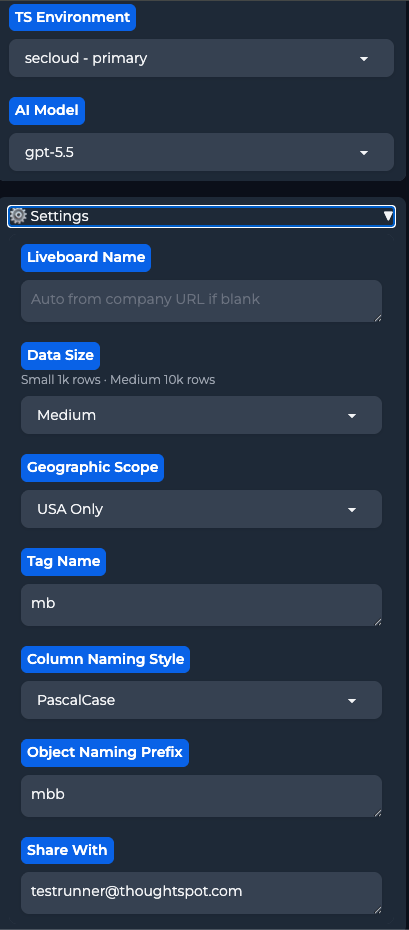
The right panel controls your ThoughtSpot connection, AI model, and tracks progress as the pipeline runs. Set it up before hitting GO.
TS Environment
Choose which ThoughtSpot instance to deploy to. Required — GO will not run without a selection.
AI Model
Select the LLM for the build. GPT-5.5 is the current default — Claude models are also available for higher reasoning quality.
⚙️ Settings (click to expand)
Collapsible section with per-run options that take effect immediately — no save or reload needed:
- Liveboard Name — leave blank to auto-derive from the company URL
- Data Size — Small (~1k rows, fast) or Medium (~10k rows, richer data)
- Geo Scope — USA Only or International location data
- Tag Name — optional tag applied to all created TS objects
- Column Naming Style — Regular Case, snake_case, camelCase, PascalCase, etc.
- Object Naming Prefix — short prefix added to model and liveboard names
- Share With — ThoughtSpot email to share the liveboard with after deployment
Pipeline Progress
Once GO is pressed, watch the stages tick through in real time — Research → DDL → Data → ThoughtSpot → Liveboard → Complete. Pipeline Status shows live output as it runs.